
Meetings can be terrible
If you work in an office and attend meetings and you’ve never read “Death by Meetings” by Patrick Lencioni, you should. It’s a classic, quick read. Lencioni uses stories, or fables as he calls them, to describe those terrible meetings we’ve all experienced. You can feel the life and energy drain out of you as you read. He then breaks down the fundamentals of great meetings and provides solid tactics to turn boring wastes of time into energy-producing, focused gatherings.
Meetings can be great
How you run your meetings and how you use your tools matters. Lencioni provides some excellent examples of what not to do, and how to structure a great meeting. Lucky for us, the principles of a great meeting fit perfectly with how Bria Teams is designed to work.
What makes a great meeting?
One key factor that enables a great meeting is the right amount of drama. Shouting and fist-slamming are not ideal for any good interaction, but boredom does not inspire creative, dynamic thinking. Finding the right balance been the extremes of rage and boredom is central to running a good meeting. Identify a challenging task to discuss, bring the right people in the room with a clear focus, and set a precise goal for your conversation. If you allocate enough time to research and prepare for a meeting, you’ll get informed thoughts from team members rather than opinions off the top of someone’s head, which sometimes generate the wrong type of drama or boredom.
The second key factor is the right structure. If you have regular meetings without a clear purpose, your team will not know if they are debating, voting, brainstorming, weighing in or just listening. You won’t get the right responses from your team as they’re not given the context for how they should respond. If someone is bringing up an idea to see if it is worth pursuing, they may benefit from some quick reactions from the group to determine whether it is worth spending time on. However if someone has spent months working an idea into a proposal and has decided to bring it forward for a vote to proceed, a brainstorming response is not ideal. Giving your team time to prepare for meetings and providing context about how to respond through structure are important ways you can set a meeting up for success.
Principles of a great meeting
A few key principles to a great meeting will make a significant difference to your meetings. The Forbes leadership forum describes the 7 key items for running a successful meeting:
- Make your objective clear
- Consider who is invited
- Stick to your schedule
- Take no hostages
- Start on time, end on time
- Ban technology
- Follow up
However, that assumes everyone is in the same physical space, which doesn’t fit with how we work today in the modern office. Someone is going to be traveling, someone is going to be at home to receive a package or watch a family member, and someone is going to be remote. There are ways to take the same key principles of a great meeting and apply them to our modern experience.
Make your objective clear
It’s important to identify what a meeting is for. We’re all busy people, and we’ve got a lot on our minds. From key priorities at work, to what is going on at home, to that delicious sandwich we’re looking forward to at lunch. If you’re leading a meeting, or planning one – make sure you give everyone a quick, gentle reminder about the focus of the meeting. If it’s a daily standup, call out when someone gets too deep in a subject. If it’s a monthly strategy meeting, be aware of someone in the room who is listening, but not contributing. The best way to accomplish this is through a clear, concise agenda. List who is attending, the purpose of the meeting and the topics to be covered. Have a clear facilitator or leader for the meeting. Identify if you’re covering a new idea and want fresh thinking, or if you’re reviewing a document, and provide it in advance for review. Identify what the ideal outcome would be. The simplest form of this is People / Purpose / Payoff. You should always be able to identify those 3 elements in your agenda. Provide an agenda in advance, or send it through IM before a meeting to ensure everyone is clear on the type of meeting and the goals.
Consider who is invited
It’s easy to scoop up everyone who should be consulted for a meeting in your invite. Think through who needs to be in a meeting, and who needs to be informed or consulted. If you’re reviewing a document, can any of your meeting attendees review the material in advance and provide comments? Can you make anyone optional and have them collect the notes from a meeting? With Bria Presence and instant messaging, you can identify someone who may need to step into, and out of a meeting when there are key decision points. They can be available for the meeting time and near a phone or computer. When you need their quick review and decision, message or call them through Bria, link them into the conversation for a quick summary, then collect their input and release them from the meeting. You’ll be surprised at how much people appreciate you respecting their time.
Stick to your schedule
Your agenda should have the points you’re looking to cover in a meeting, the person leading the conversation on those points, and the rough time you expect to dedicate to those points. If one item on your list should take 5 minutes, stick to that time frame, and schedule a follow-up if there is significant discussion around this point. Record the key points in your notes, and identify that you’re going to follow up with another meeting to continue the conversation, or if possible, identify the group of people who should follow up outside the meeting on their own time. Sometimes 2 people can finish their conversation and update the group with the outcome. If items take less time on your agenda than you expect, end your meeting early. A meeting that covers the schedule efficiently and ends early always feels better.
Take no hostages
If you’re leading a meeting, then make sure everyone in the room gets a chance to speak. Don’t let one person monopolize the conversation. If someone is talking too much it’s your responsibility to call that person out. You can say something like “We appreciate your perspective, but we need to hear from others before we can make a decision and move on.” Make this public and out loud, and follow up with everyone consistently. If you have to do this more than once, set clear meeting ground rules as you start, or add them to the agenda and refer back to them. Establishing ground rules early for how your meetings will run will set the tone.
Start on time, end on time
We’ve all had those meetings where you get on a conference call or video chat, and you spend the first 10 minutes asking if anyone can hear you, and asking who else should be in the room, and where is that person. When you finally get started, it’s hard to get momentum and move forward. Everyone who is waiting has likely started checking email or had some distraction take their attention elsewhere. Using the same technology and setup, whether you’re at the office, at home, or traveling allows you to connect quickly and reliably with robust software. If you have a solid agenda, you can see who should be in the room, and use presence to see where they are. You can identify if they’re caught on a call with a customer, or if they need a reminder. Often you can reach out through IM and ask if they’re on their way, or if you should begin without them. Having a connected set of communication tools allows you to reliably connect to a meeting and see the status of your team quickly. You also want to ensure you end on time. If the group is having active discussions, you can add a note through IM to say you’re approaching the 5-minute to-go mark, and everyone needs to summarize so you can respect their time. With everyone on the same toolset, you can run crisp meetings, which everyone will appreciate.
Ban technology
If everyone in your office is in the same physical space, and you sit around a fancy oak boardroom table with high-back leather chairs, then yes – you can ban technology from the room. However, for the rest of us who need to stay connected, or do research during a meeting, it’s complex to ban technology. The goal of removing technology is to keep your focus on the purpose of the meeting. If you’re working from home, or traveling, it’s very helpful to have your team available for check-ins or connected. Using mobile devices to raise your hand in a meeting to speak next can be very useful. If you’ve got a group of people in a meeting room, and a handful of people remote, it can be hard to watch for cues that someone remote is interested in speaking to a topic or following up on a point. If you use your mobile devices to add your name to a list, or IM a note that you’d like to speak to the same topic, or branch to a new idea, the person running the meeting can follow along with the chat and direct the conversation where it needs to go. Using technology in a meeting is like any discipline. If you’re bored, you’ll look out the window or doodle with your pencil. Maintaining attention should be the responsibility of the person setting up the meeting, with the right people in the room, a focused agenda, and a clear objective. If you have that, then the technology in your hands will be used for the meeting. If you give everyone a role with their device (update IM when you’d like to speak next) then they can add links, references, and notes to help guide the discussion and support the ideas they are bringing forward in the meeting.
Follow up
Whatever you discuss during a meeting, unless it’s a 5-minute standup, you’ll likely have notes, action items, and follow-up items. There may be people who were not able to attend the meeting and would like a summary of the discussion. If you weren’t tracking the conversation in a chat, or collecting points through IM as you go, then identifying a clear set of notes, action items, and tasks is essential. You can use the Bria messaging history to pull notes out, identify who from the group picked up a task, and assign an owner and a completion date for each action item. You can also use group messaging and integrated file sharing to send out the follow-up notes to the participants in the conversation, and those who need to be informed or consulted on any outcomes. You should always do this within 24 hours, but Bria Teams allows you to collect and send notes as a follow-up in minutes or as a real-time output of your conversation.
Great meeting structure
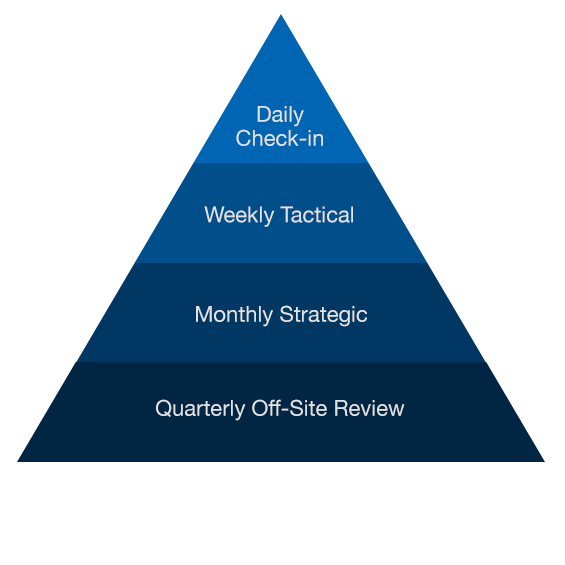
| Meeting Type | Time Required | Purpose & Format | Keys to Success |
| Daily Check-In | 5 – 10 minutes | Share daily schedules and activities. | Don’t sit down. Keep it administrative.Don’t cancel even when some people can’t be there. Keep a consistent format. |
| Weekly Tactical | 45 – 90 minutes | Review weekly activities and metrics, and resolve tactical obstacles and issues. | Don’t sit down. Keep it administrative. Don’t cancel even when some people can’t be there. Keep a consistent format. |
| Monthly Strategic | 2 – 4 hours | Discuss, analyze, brainstorm, and decide upon critical issues affecting long-term success. | Limit to one to two topics. Prepare and do research. Engage in healthy conflict. |
| Quarterly Off-Site Review | 1 – 2 days | Don’t set agenda until after initial reporting. Postpone strategic discussions to monthly strategic. | Review strategy, industry trends, competitive landscape, key personnel, and team development. |
- Chart summarized from the book
“Bad meetings, and what they indicate and provoke in an organization, generate real human suffering in the form of anger, lethargy, and cynicism.” – Lencioni, Death by Meetings